Advanced Claude Code Techniques: Managing Context, Sessions, and Token Efficiency
Fourteen tactics that cut my token usage in half for the same work.

You already know the basics. You write slash commands, you wire up tools, you let the model edit files. And yet your sessions are bleeding tokens. A ten-minute task somehow swallows 400K tokens, and you hit a rate limit before lunch. The model didn’t get worse. Your context got fat.
Every section below is a problem, a tactic, and a tradeoff. Nothing else.
1. The core mechanic: why context is the bottleneck
The model is stateless. There is no memory on the server. Every single turn, every keystroke you send, every tool call the model makes, the client repackages the entire conversation so far and re-sends it. System prompt, all tool schemas, every user message, every assistant message, every tool result. All of it. Every turn.
The 1M-token context window is forgiving, and that’s the problem. You never get the “context full” signal that would force you to clean up. You just get a steadily rising bill and, eventually, a rate-limit slap.
Prompt caching softens the blow but doesn’t fix it. Anthropic’s prompt cache is a server-side optimization that stores the prefix of a request, with a default TTL of about 5 minutes (a 1-hour option exists for an extra cache-write premium). When your next turn starts with the exact same bytes as the cached prefix, you skip re-processing and pay a cache-read rate of roughly 10% of input cost. The model is still stateless. The cache is just a network and compute shortcut for repeated prefixes. It doesn’t remember anything. A few things to know:
The cache works on the entire request prefix, including system prompt, tool definitions, prior assistant messages, and tool results. Not just user reads.
Any Edit to a file the model already read breaks the cache from that point forward. The tool result for that Read now contains different bytes, and everything after it re-bills at full rate.
Pause for more than 5 minutes (coffee, meeting, lunch) and the default cache evaporates. Your next turn pays full price for the whole conversation. The 1-hour TTL is worth setting on long sessions if your client supports it.
Cache doesn’t shrink the conversation. You still pay output tokens for every response, and the uncached portion after any change gets billed in full.
The math of tool bloat. A single Read on a 500-line file is roughly 15-25K tokens (line numbers add bulk). A Grep across a large repo with output_mode: "content" and no head_limit can easily return 30K+ tokens. A screenshot from Chrome DevTools MCP comes back as base64. A 100KB PNG inflates to about 135KB of text, which on Claude’s tokenizer comes out around 35K tokens when the screenshot is inlined as text content. (Images sent through the proper vision endpoint are billed by image size, not base64 expansion. Different math.) Ten of those text-blob screenshots and you’ve burned 350K tokens on pictures. The conversation doesn’t forget any of it. Every subsequent turn re-sends all of it.
The model’s intelligence is fixed per turn. The cost is determined by what you put in front of it. That’s the whole game.
2. Context hygiene tactics (per-turn wins)
These are the cheap wins. Do them reflexively.
Never re-Read a file already in context
If a file appeared in the conversation this session, whether through Read, a Grep with -C, or a tool’s output, it’s still there. Scroll up mentally. Don’t re-read it.
Claude Code now tracks file state and will often warn you when you re-read. The discipline still has to be yours. The common anti-pattern: reading a file, editing it, then re-reading the whole thing to “verify.” The edit tool already errors if the change didn’t apply cleanly. Re-reading a 600-line file to confirm a 3-line change is an 18K-token mistake, and I’ve watched myself make it more times than I want to admit.
Scoped reads beat full-file dumps
Before you Read a big file, Grep for the symbol you care about. Then Read with offset and limit around the hit.
# Bad: reads all 1,200 lines of the controller
Read(file_path="...OrderController.cs")

# Good: find the method, read only the window you need
Grep(pattern="ProcessRefund", path="...OrderController.cs", -n=true)
Read(file_path="...OrderController.cs", offset=340, limit=80)
A 1,200-line file is roughly 30K tokens. An 80-line window is roughly 2K. Do this 20 times in a session and you’ve saved half a million tokens.
Stop using Bash for file operations
Never cat, head, tail, find, ls -R, grep, or rg from the Bash tool. Use Read, Glob, and Grep.
Bash output is unstructured text that the model has to re-parse. The dedicated tools are optimized. Grep uses ripgrep internally with sensible defaults. Glob returns sorted paths. Read adds line numbers the model can reference in follow-up Edit calls. Bash find . on a node_modules-adjacent tree can dump 50K+ tokens of garbage.
The only time to shell out for file ops is when you need something structurally impossible otherwise, like git log --stat for change history.
Budget your screenshots
Treat browser and Figma screenshots as expensive. Take one, do the work, don’t take another unless state changed.
Chrome DevTools MCP screenshots run 80-150KB of PNG data before base64 inflation. Figma get_screenshot is similar. If you’re iterating on a UI fix and take a screenshot after every edit, you’re paying tens of thousands of tokens per iteration just to look at the page. Make the full change, then screenshot once. If you need to inspect a specific element, use get_page_text or the DOM tools. They’re a fraction of the size.
Quiet your build and test output
Configure your build commands for minimum output. Verbose logs are context poison.
# .NET
dotnet build -v q --nologo
dotnet test --verbosity quiet --nologo

# Node
npm ci --silent
npm run build -- --silent
pnpm install --reporter=silent

# Python
pytest -q --no-header
A noisy dotnet build emits 8-15K tokens of per-project spam nobody reads. Quiet mode drops it to a few hundred. Same story for npm install pulling down 600 packages with progress bars.
If a build fails, re-run verbose. Don’t run verbose by default.
3. Session boundary management (the hard problem)
This is the section most people skip and then wonder why they’re out of tokens at 2pm.
The reality
Sessions don’t have clean endings. You’re not going to finish one discrete task, run /clear, and start the next. Real work drifts. You start investigating a bug, end up reading unrelated code for context, fix the bug, then pivot to a related refactor, then someone asks about the deployment. By hour three, your context is 80% sediment. Tool results from three tangents ago that nobody needs anymore.
The goal isn’t clean sessions. The goal is to shed context aggressively when topics shift.
Four tools, four use cases
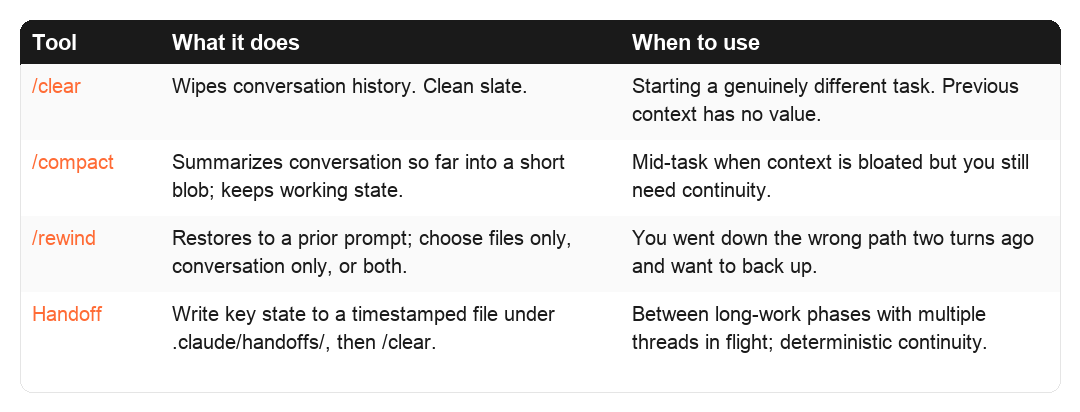
Tool What it does When to use /clear Wipes conversation history. Clean slate. Starting a genuinely different task. Previous context has no value to the next step. /compact Summarizes conversation so far into a short blob; keeps working state. Mid-task when context is bloated but you still need continuity. /rewind (Esc-Esc) Restores to a prior prompt; you choose files only, conversation only, or both. You went down the wrong path two turns ago and want to back up without losing earlier work. Handoff (lifecycle) Write key state to a timestamped file under ./.claude/handoffs/, then /clear. Between phases of long work, especially with multiple threads in flight, where you want deterministic continuity instead of a model-generated summary.
/rewind is newer and underused. It auto-checkpoints before every Edit/Write call (note: Bash-modified files are NOT tracked). Picking “restore both” actually forks the session, so you can branch and explore. Combined with git commits, you have two layers of undo: /rewind for fine-grained tool-level steps, git checkout for code-level rollback.
/compact is the underused middle ground
Most people treat /compact as automatic. “It’ll happen when I hit the limit.” Use it deliberately, with instructions.
/compact Keep the database schema we worked out and the list of files changed. Drop all the exploratory reads and the Stack Overflow tangent.
The instruction steers what survives. Without instructions, you get a generic summary that may discard exactly the thing you needed. The token cost of /compact is real because it does a full-context read to produce the summary. But the next 20 turns operate on a fraction of the prior bulk, which is the whole point.
Tasks: persistent state inside a session
TaskCreate, TaskList, TaskUpdate, TaskGet. Tasks are file-backed work items that survive /clear and can be read by parallel subagents. Earlier versions called these “Todos” and they vanished with the session. Tasks now persist, support addBlockedBy / addBlocks dependency chains, and can coordinate across worktrees via CLAUDE_CODE_TASK_LIST_ID.
Use them when a piece of work has 3+ stages, when you want a subagent to pick up where you left off, or when you genuinely want progress visible across /clear boundaries. Don’t use them for trivial single-step work.
The handoff lifecycle (not just a note)
When you’ve hit a natural phase boundary, write the essential state to disk, then clear.
The naive version is one file: write ./HANDOFF.md, /clear, read it in the next session. That works exactly until the moment you pause feature A to fix urgent bug B. Now B’s handoff overwrites A’s, and when you come back to A next week you’ve got nothing. Writing the note is easy. Managing handoffs over time is the real problem. Multiple concurrent threads, detecting when a handoff has gone stale, archiving the ones that are done.
Plenty of people solve the single-file problem. Fewer solve the lifecycle. What I built, running daily in production now, is a directory of handoffs, three custom slash commands, and staleness detection driven by git reachability. None of it ships with Claude Code. You wire it up yourself.
Location
./.claude/handoffs/
  2026-04-13T01-07-42Z_auth-refactor.md
  2026-04-12T15-30-00Z_deploy-debugging.md
  archive/
    2026-04-10T09-00-00Z_feature-x-done.md
Per-repo, local-only, gitignored. Handoffs reference uncommitted working-tree state tied to one machine. They have no business being synced or committed. If the information is worth sharing across machines, that’s what git commits are for.
File header: the lifecycle anchor
Every handoff starts with a YAML frontmatter block:
---
created: 2026-04-13T01:07:42Z
topic: auth-refactor
branch: development
head_commit: abc1234
uncommitted_files: 3
status: active
---
head_commit is the hook that makes staleness detection possible. If that commit no longer exists (rebased away, branch force-pushed), the handoff is almost certainly pointing at code that isn’t there anymore. If current HEAD is 50+ commits ahead of it, the world has moved on.
Three custom slash commands do the whole lifecycle
/handoff writes a new one. - Captures branch, HEAD commit, uncommitted file count into the frontmatter. - Prompts for a topic slug (auth-refactor, not handoff-1). - Writes ./.claude/handoffs/<timestamp>_<slug>.md. - Adds .claude/handoffs/ to .gitignore on first run. - Recommends /clear when done.
/pickup picks up an old one. - Lists active handoffs newest-first: topic, age, branch, whether the head_commit is still reachable. - Auto-picks if there’s only one active. Otherwise you choose. - Surfaces staleness warnings before handing you the content. - Moves the file to archive/ after you’ve read it, so the same handoff doesn’t get picked up twice.
/handoff-prune does cleanup, typically run at session start. - Auto-archives handoffs older than 14 days. - Auto-archives any whose head_commit no longer exists or whose branch was deleted. - Flags (but doesn’t auto-archive) when current HEAD is 50+ commits ahead, or when the topic slug shows up in recent commit messages. Both signal the work probably landed. - Deletes files in archive/ older than 90 days.
Staleness rules at a glance
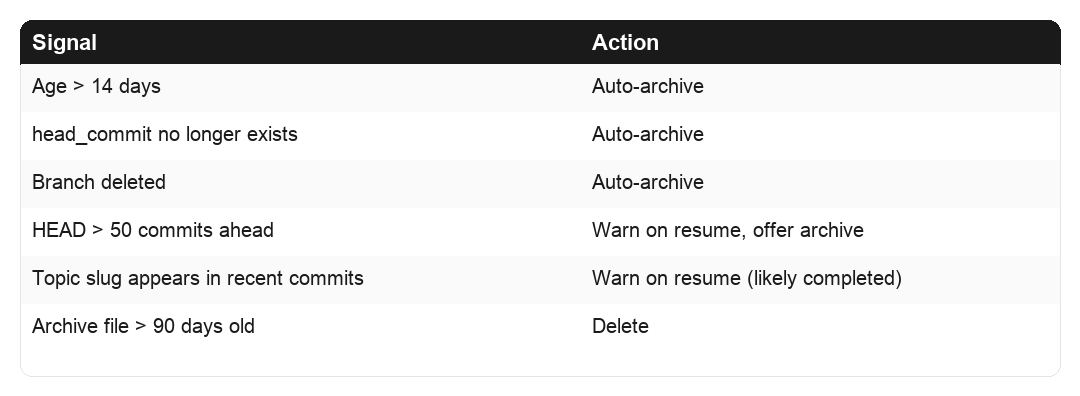
Signal Action Age >14 days Auto-archive head_commit no longer exists Auto-archive Branch deleted Auto-archive HEAD >50 commits ahead Warn on pickup, offer archive Topic slug appears in recent commits Warn on pickup (likely completed) Archive file >90 days old Delete
Why this beats the single-file version
Concurrent threads stop stepping on each other. Pause feature A, /handoff. Get pulled into bug B, /handoff again. Two files in active/, neither overwritten. /pickup lets you choose which one to continue.
Stale handoffs self-destruct. The prune logic runs at session start, so last month’s abandoned debugging note doesn’t sit around pretending to be live context.
You get a short-term audit trail. archive/ holds recently-completed work for a window, and when you catch yourself thinking “how did I approach this last time?”, the answer is often still on disk.
It stays local. Handoffs belong to the machine where the uncommitted work lives. Anything worth propagating across machines gets committed.
Anti-patterns
Don’t commit handoffs. They reference uncommitted local state. Gitignore them on day one.
Don’t skip the slug. handoff-1 tells you nothing a week later. auth-token-migration tells you exactly what you were in the middle of.
Don’t resume stale blindly. The staleness warnings are there because force-pushes and rebases happen. If the handoff points at a commit that no longer exists, trust the warning over the note.
Don’t treat handoffs as documentation. If a fact is worth keeping past two weeks, it belongs in memory, a project doc, or a commit message. Not in an ephemeral handoff file.
This beats /compact when you want control over what carries forward. You wrote the note, so you know what’s in it. A model-generated summary can quietly lose the one critical fact you needed.
Git commits as natural checkpoints
Commit at every logical boundary, not at the end of the session.
An uncommitted working tree is a reason not to /clear. The model needs the context to keep its work coherent. A committed working tree is freedom. The code is safe, the state is in git, and the next session can git log its way back to orientation in 2K tokens instead of re-reading everything.
The anti-pattern is hoarding 15 changes into one big commit at end of day. You’ve now locked yourself into one giant session for the whole day’s work, because clearing means losing context the model needs to finish.
Parallel sessions for genuinely different tasks
If you’re working on two unrelated things, open two Claude Code instances.
One terminal for the backend refactor. Another for the email template tweak. Neither pollutes the other. When you /clear in one, the other is untouched. Don’t try to multiplex unrelated work in a single session. The shared context is pure overhead for both.
/resume is your safety net
/clear is not permanent. /resume can pull back prior sessions on the same machine (sessions persist as JSONL under ~/.claude/projects/). This should make you more willing to clear, not less. If clearing turns out to be premature, you haven’t lost anything. You’ve just paid for a cleaner workspace.
The mental model
Stop thinking of context as “the conversation.” Think of it as the minimum state needed to produce the next correct action. Most of what’s in your context right now isn’t minimum state. It’s sediment.
4. Subagent delegation (biggest lever for long sessions)
If you take one architectural idea from this article, take this one.
Why subagents are the single biggest win
When you spawn a subagent, it runs with its own separate context. It does the searches, reads the files, runs the tools. Then it returns a summary, usually a few hundred to a few thousand tokens. All the tool noise stays in the subagent’s context and vanishes when the subagent finishes.
Your main session sees a task dispatch and a short report. Not the 50 files the subagent read to produce that report.
When to reach for a subagent
Broad codebase search. “Find every place we handle refund state transitions.” A grep-read-grep-read loop across 30 files is a context disaster inline. Perfect subagent work.
Log scans. “Check the last 500 lines of Application Insights for errors in the checkout flow.” The subagent can pull, grep, and summarize. You see a one-paragraph digest.
Multi-file exploration. “Trace how OrderId flows from the API layer down to the database.” Ten files opened, one summary out.
Any large read. A 2,000-line generated client file you need three things from. Subagent.
Specialized vs general-purpose subagents
A general-purpose subagent works for most exploration. For repeated flows, define specialized agents with tighter system prompts, restricted tools, and domain knowledge baked in. A sql-analyst that already knows your schema. A deployment-checker that knows your Azure setup. These run faster and produce tighter summaries because they don’t need orientation.
How to define a specialized agent
Agents are markdown files with YAML frontmatter at ~/.claude/agents/<name>.md (global) or ./.claude/agents/<name>.md (per-project). A definition has a name, description, model preference (usually Haiku or Sonnet), tool restrictions, and a system prompt. The description is what the main model reads when deciding whether to dispatch, so be specific. Tool restrictions are load-bearing. A log scanner doesn’t need Edit or Write.
Example ~/.claude/agents/log-scanner.md:
---
name: log-scanner
description: Scans Application Insights and Azure Log Analytics for specific
  error patterns. Returns concise summaries.
model: haiku
tools: [Bash, Grep]
---

You are a log-scanning specialist. Given a time window and search pattern:

1. Query the logs with `az monitor app-insights query` or equivalent.
2. Filter for the pattern, group by severity.
3. Return a one-paragraph summary with counts and top 3 most relevant messages.
4. Do NOT dump full log lines unless specifically asked.
5. If a query would return >500 lines, sample instead of returning all.
When is it worth defining one? If you’ve done a similar scan/query/check more than three times, turn it into an agent. Below three, general-purpose is fine. Above, the specialized agent pays for itself in tighter summaries and faster turnaround, and the definition doubles as documentation for future-you.
Background agents for long operations
Use run_in_background: true on Bash calls that take more than a few seconds.
Bash(command="dotnet publish -c Release -o ./publish", run_in_background=true)
You get a process handle back immediately, continue working, and get a notification when it finishes. Otherwise you’re blocking the conversation on a 90-second build. Same logic for terraform apply, long test runs, az webapp deployment, npm run build on a big Next.js app.
Worktree isolation for risky experiments
For subagent work that might break things (mass refactors, dependency upgrades, schema migrations), run the subagent in an isolated git worktree. The main branch stays clean. Pass isolation: "worktree" in the subagent invocation, or launch a parent session with claude --worktree <name>. Either way you get a separate filesystem and branch. If the experiment works, merge. If it doesn’t, nuke the worktree.
5. Memory system for cross-session continuity
Memory is for things you want to persist beyond the current session without re-teaching them.
What belongs in memory
Stable facts. “The staging DB connection string lives in Key Vault secret db-staging-cs.” Doesn’t change often.
Incident learnings. “Last time we deployed to prod on a Friday, the Redis connection pool exhausted. Don’t do Friday deploys.”
User preferences. “Always use DateTimeOffset not DateTime.” These also belong in CLAUDE.md, but memory is better for context-dependent preferences.
What does NOT belong in memory
Transient state. “We’re currently debugging the refund bug.” That’s session state; use a handoff note.
Things that change. “The current version is 1.4.2.” It won’t be in three weeks.
Large documents. Memory is not a file system. Keep entries short and indexable.
Where it lives
Memory files live under ~/.claude/projects/<project-dir>/memory/. Plain markdown, one file per entry:
~/.claude/projects/webority-lps-web/memory/
  MEMORY.md
  user_role.md
  feedback_friday_deploys.md
  project_auth_rewrite.md
  reference_grafana_oncall.md
Filename prefixes mirror the four types I use: User (preferences), Feedback (corrections from prior sessions), Project (codebase-specific), Reference (pointers to docs, runbooks). This is a personal taxonomy on top of Claude Code’s memory layer; the underlying system also recognizes managed-policy and project-rules files at higher precedence, so check the docs before adopting these names verbatim.
Anatomy of a memory file
Short. YAML frontmatter for metadata. Structured so the model can apply the rule without reading the whole story:
---
name: Production deploys must be on weekdays
description: Hard rule, never deploy to prod on Friday afternoon
type: feedback
---

Production deploys must be completed by 2pm on weekdays only.

**Why:** Last two Friday deploys had Redis connection-pool issues that weren't
caught until Monday. Team lost 6 hours of weekend debugging.

**How to apply:** If the user proposes a prod deploy after 2pm any weekday or
any time on Friday, pause and ask for explicit confirmation with reasoning.
One-sentence rule, Why anchored to a real incident (so future-you won’t delete it casually), How-to-apply spelling out the trigger.
MEMORY.md as the index
Without an index, the model has no cheap way to know what’s there. A working MEMORY.md:
- [User role](user_role.md): senior .NET architect, primary stack Azure Functions
- [No Friday deploys](feedback_friday_deploys.md): hard rule, past incident
- [Auth middleware rewrite](project_auth_rewrite.md): compliance-driven, Q2 goal
- [Grafana oncall dashboard](reference_grafana_oncall.md): pointer for request-path debugging
Title plus a one-phrase reason-for-existing. The model scans the index in a few hundred tokens and reads only relevant files. Prune stale entries. Resist letting it grow past a screenful.
Anti-patterns specific to memory
Ephemeral task state. “We’re fixing the refund bug” is active work, that’s a handoff.
Facts that change. Shelf life under a month, don’t persist.
Full documents. Memory is an index to knowledge, not a container.
Redundant with CLAUDE.md. Don’t duplicate. You’ll double-bill and eventually update one and forget the other.
6. CLAUDE.md hierarchy and discipline
CLAUDE.md is loaded into every session’s system context. Every line costs you tokens on every turn, forever.
Levels
Global (~/.claude/CLAUDE.md) applies to every project. Keep this tight.
Project (./CLAUDE.md at repo root) applies to this codebase only.
Managed policies and drop-ins exist for enterprise installs and override user-level files. Most solo developers never touch them, but if you’re on a managed workstation, your CLAUDE.md may not be the highest-priority instruction set.
Push project-specific rules down. If a rule only matters for one repo, it doesn’t belong in global. A global CLAUDE.md that mentions specific database schemas or specific Azure subscriptions is bloat for every other project.
Ruthless pruning
Read your CLAUDE.md and for each line ask: does this change model behavior in a way I can observe? If not, delete it.
Common bloat:
Aspirational principles (”write clean code”) that don’t steer any specific decision.
Redundancy with well-known conventions. You don’t need to tell the model what SOLID is.
Rules the model already follows by default.
A 400-line global CLAUDE.md is maybe 8K tokens added to every turn of every session. That’s not free.
Enforceable vs unenforceable rules
Some rules prose can enforce. “Use DateOnly for dates” works because the model reads it naturally and does it. Others prose cannot. “Never run rm -rf without confirming” is the kind of thing the model can forget under pressure. Unenforceable rules belong in settings.json as deny rules or hooks (next section).
Syncing global CLAUDE.md across machines
If you use Claude Code on multiple machines, you need a sync story. A simple one: keep CLAUDE.md in a GitHub gist and pull it at session start.
# In global CLAUDE.md:
# At session start: gh gist view <id> -f CLAUDE.md
# Compare last-sync timestamps, pull if remote is newer
Pair this with a SessionStart hook that runs the fetch automatically. Done once, works forever.
7. Deterministic enforcement via settings.json
Prose is probabilistic. Hooks and permissions are deterministic. If a rule absolutely must not be broken, don’t write it in CLAUDE.md. Put it in settings.json.
Deny rules for destructive or wasteful commands
{
  "permissions": {
    "deny": [
      "Bash(rm -rf *)",
      "Bash(git push --force*)",
      "Bash(find /*)",
      "Bash(cat *)",
      "Bash(grep *)"
    ]
  }
}
The last three deny the cat/grep/find anti-patterns from section 2 at the enforcement layer. The model can’t bypass them under any prompt. Effective against both the model’s bad habits and your own when you’re tired.
A caveat the docs themselves call out: Bash pattern matching is naive. A determined adversary or a confused model can sometimes bypass Bash(rm -rf *) via subshells, env-var expansion, or quoting tricks. Treat Bash deny rules as friction against everyday mistakes, not as a true security boundary. For real isolation, use sandboxed execution or filesystem-level write protection.
Start narrow. Aggressive denies have false positives
Those aggressive patterns block legitimate work. Bash(cat *) kills cat file | jq pipes. Bash(grep *) kills git log --oneline | grep fix and every | grep pipeline. Bash(find /*) is narrow (root-rooted only), but people often widen it to Bash(find *), which kills find . -name '*.cs' traversal.
Start with rules for things purely destructive or wasteful, observe friction for a week, then narrow. Safer starting point:
"deny": [
  "Read(**/.env*)",
  "Read(**/*secret*)",
  "Read(**/*.pem)",
  "Bash(rm -rf /*)",
  "Bash(git push --force*)",
  "Bash(*Compress-Archive*)"
]
Bash(rm -rf /*) blocks root wipes. Bash(rm -rf *) also blocks rm -rf node_modules and rm -rf ./publish, which are legitimate cleanups. Write the narrow pattern, not the scary-looking one.
The full hook surface
The hook system has grown well past SessionStart and PostToolUse. The full set worth knowing:
SessionStart(withmatcherofstartup/resume/clear): sync configs, fetch credentials.UserPromptSubmit: stdout gets injected into the conversation. Use this to inject git status, current time in IST, or a small runbook every turn.PreToolUse/PostToolUse/PostToolUseFailure: gate or react to tool calls. Auto-format on Edit, deny shell access for certain commands, log on failure.Stop/SubagentStop: fire when the model finishes. Trigger a build, ping a notifier, archive a transcript.PreCompact/PostCompact: archive the full transcript before auto-compaction destroys it.SessionEnd,Notification,PermissionRequest,TaskCreated,FileChanged,WorktreeCreate: niche but useful in specific automation flows.
A full list lives in the Claude Code docs. The two I underuse and now wish I’d wired up earlier: UserPromptSubmit for ambient context injection, and PreCompact for archival.
SessionStart hook for auto-sync
{
  "hooks": {
    "SessionStart": [
      {
        "command": "gh gist view af524f... -f CLAUDE.md > ~/.claude/CLAUDE.md.remote && <compare and replace logic>"
      }
    ]
  }
}
Runs before the first turn. User doesn’t have to remember to sync. Verify the exact schema in your version’s docs; matcher and field names evolve.
PostToolUse hook for auto-format
Illustrative pseudo-code. Hook schema, matcher syntax, and substitution variables (like
$file_path) vary between versions. Verify against your release notes before wiring up.
{
  "hooks": {
    "PostToolUse": [
      {
        "matcher": "Edit",
        "command": "prettier --write $file_path"
      }
    ]
  }
}
The model doesn’t have to remember to format. The format just happens.
When to prefer hooks over prose
Behavior that must be 100% reliable (safety, compliance, formatting).
Behavior the model tends to forget under context pressure.
Behavior that’s cheap to automate but expensive to repeat in prose.
Prose is still right for nuanced guidance like “prefer composition over inheritance.” Hooks are right for mechanical rules.
8. MCP server diet
Every MCP server you have connected loads its tool schemas into your system prompt on every turn. A Figma server with 15 tools, a Chrome server with 20, a Gmail server with 8. That’s 40+ tool schemas, each with parameter descriptions, easily 10-20K tokens just sitting there in case you need them.
Audit regularly
claude mcp list
For each server, ask: did I use this in the last two weeks? If no, disconnect.
Common offenders
Canva, Gamma. Connected once to try them, never used again.
Gmail. Connected for one task, now hanging around.
Notion, Linear, Jira. Huge schemas, only useful in specific workflows.
Disconnect them. Reconnect when you need them. It takes 30 seconds.
Local vs claude.ai-registered servers
Servers registered on claude.ai propagate everywhere you use Claude. Servers configured locally only affect the current machine. For personal tools, prefer local. It keeps your global footprint smaller.
Deferred tool loading (first-class token win)
On supported versions, tool names and short descriptions sit in the system prompt, but full JSON schemas (parameters, descriptions, enums) only load when the model actually calls a tool, typically via a ToolSearch mechanism fetching on demand.
Why it matters. A Chrome DevTools MCP with 25 tools and full schemas weighs ~15K tokens per turn. Deferred loading turns that into ~2K of names plus an on-demand fetch. Across three or four MCPs, the difference between a 40K-token and 6K-token system prompt, every turn.
When it’s available. Check your version. Some enable it automatically, some need a flag, some don’t support it. Worth upgrading for.
The tradeoff. A small round-trip the first time the model needs an unloaded tool. A few hundred extra tokens and a bit of latency for that call. Against 10K+ tokens saved per turn, obvious win.
Relation to the MCP diet. Not a license to keep every MCP ever installed. Loaded names still cost. Not 15K, but not zero. Priority: disconnect unused > defer loaded > keep-loaded.
9. Model routing
Different tasks deserve different models. Running Opus for a one-line typo fix is waste. Running Haiku to architect a system is malpractice.
Rough allocation
Opus 4.7 (claude-opus-4-7) for planning, architecture, ambiguous requirements, multi-step reasoning, “figure out why this is broken.” Best quality reasoning, highest cost.
Sonnet 4.6 (claude-sonnet-4-6) for implementation from a clear plan, writing code, editing files, running tests. The workhorse. You’ll use it most.
Haiku 4.5 (claude-haiku-4-5) for lookups, simple file reads, log scanning, “what’s the current time in IST,” renaming a variable, scanning through hundreds of log lines. Fast and cheap.
Setting the default and switching
Launch with an explicit model. claude --model haiku for grep-heavy exploration, claude --model sonnet for normal coding, claude --model opus for planning or hard debugging. Defaulting to Sonnet and explicitly upgrading to Opus avoids paying Opus rates for a session you never needed to.
Mid-session (syntax varies): /model <name> if supported, otherwise handoff + /clear and relaunch. Don’t flip casually. Switches can reset cached prefix state. Pick a phase (plan / build / verify), set the model, switch at boundaries.
Per-subagent model selection
The bigger win than switching the main session is selecting a cheaper model for subagents. An agent that scans logs, searches code, or summarizes a report doesn’t need Opus-level reasoning. Your main Sonnet thread pays Sonnet rates for a short summary instead of Opus rates for 20K tokens of log noise. Set model: haiku (or sonnet) in the agent’s frontmatter.
Cost math (current pricing)
Per million input tokens, the 4.x generation is roughly: Opus 4.7 ~$5, Sonnet 4.6 ~$3, Haiku 4.5 ~$1. Output tokens cost 5x the input rate at each tier. So Opus is roughly 1.7x Sonnet and 5x Haiku on input cost. Much narrower than the older Opus 3 / 4.1 generation when Opus was 5x Sonnet and 15x Haiku. The relative gap has tightened considerably. Always check current Anthropic pricing before optimizing aggressively, because these numbers move.
Operating rule: never use an expensive model for work where the answer is smaller than the inputs. Bulk-read-then-summarize is Haiku. Sonnet for structured code. Opus when reasoning is the work.
10. Visibility tools
You can’t manage what you can’t see.
/context
Shows your current context usage. Use it. Before you take a screenshot or do a big read, glance at where you are. At 30% you’re fine. At 75% maybe delegate or compact before the expensive operation.
Custom status line
Claude Code supports custom status lines. Put current context usage on it so you see it every turn.
Version-dependent example. The variable names below (
CLAUDE_CONTEXT_PERCENT,CLAUDE_MODEL) are illustrative. The actual contract (env vars, stdin JSON, or a state file) varies between Claude Code versions. Check your release notes orclaude --help.
{
  "statusLine": {
    "command": "echo \"ctx: ${CLAUDE_CONTEXT_PERCENT}%  model: ${CLAUDE_MODEL}\""
  }
}
More portable: have the status-line command shell out to a small script that reads whatever your version exposes. When the contract changes, you update one script instead of editing JSON.
The principle matters more than the syntax. If you can see context usage every turn, you’ll act on it. If you can’t, you won’t.
Why visibility changes behavior
It’s the speedometer effect. You drive differently when you can see your speed. You use Claude Code differently when you can see that you’re at 60% context three turns into a task.
11. Skills, slash commands, and plugins
Three flavors of model-extending markdown. Worth understanding the differences.
Slash commands: user-invoked recipes
~/.claude/commands/*.md for global, ./.claude/commands/*.md for project-specific. The filename (without .md) becomes the slash command name. A slash command runs only when you type it.
---
description: Write a handoff note capturing current work state so the user can /clear and resume cleanly
---

Write a new handoff file capturing the state of the current work thread.

Steps:
1. Gather context: current branch, HEAD commit short SHA, uncommitted file count.
2. Ensure `./.claude/handoffs/` exists and is gitignored.
3. Prompt the user for a kebab-case topic slug.
4. Write `./.claude/handoffs/<UTC-timestamp>_<slug>.md` with YAML frontmatter and body sections.
5. Keep total under 400 words.
6. Recommend `/clear` to the user.
The description field is what Claude Code shows in the command palette and what the model reads when deciding whether the command is relevant. First-class, not decoration.
Skills: model-invoked capabilities
Skills live in ~/.claude/skills/<name>/SKILL.md (or per-project equivalent). Same markdown + YAML structure, but the key difference is auto-invocation. With user-invocable: true they behave like slash commands. With user-invocable: false they’re background knowledge the model can pull in when relevant, without you typing anything.
---
name: research
description: Multi-source topic research across HN, Reddit, RSS, Twitter, blogs
user-invocable: true
---
The right mental model: a slash command is a button the user presses. A skill is a tool the model knows it has. Both are markdown files; the lifecycle is what differs. Anthropic ships first-party skills (/simplify, /loop, /claude-api) and there’s a growing third-party ecosystem.
Skills also support live reloading. Drop a new SKILL.md into the directory and the next turn picks it up. No restart.
Plugins: bundled distribution
A plugin packages skills + agents + hooks + slash commands into one installable unit. Manage them with /plugin. Install with /plugin install <name>@<marketplace>. Useful when you want to share a workflow across a team without copy-pasting markdown files into every machine.
For solo work, raw skills and slash commands are usually enough. Plugins matter when you have 5+ teammates who all need the same setup.
Discipline
Don’t create a slash command or skill for a flow you might need. Create it when you’ve done the flow manually three times and it’s clearly sticking.
Example: /deploy-backend slash command
1. Run dotnet build -c Release -v q --nologo; stop on error.
2. Publish to ./publish (clean first).
3. Zip ./publish using System.IO.Compression.ZipFile (fastest).
4. Deploy with az functionapp deployment source config-zip.
5. Restart the function app.
6. Check app state with az functionapp show --query state.
Beats re-typing the sequence or watching the model reinvent it from memory every time.
Example: /ist skill
Run: date -u "+%Y-%m-%d %H:%M:%SZ" and convert to IST (UTC+5:30).
Report as: DD-MMM-YYYY HH:MM IST.
Silly but useful. I invoke it 20 times a week.
12. Going headless and autonomous
The interactive TUI is one mode. Claude Code also runs headless, scriptable, and on a schedule. This is where it stops being a coding assistant and becomes a worker.
Headless mode: claude -p
claude -p "Find all TODO comments older than 30 days and summarize" \
  --allowedTools "Read,Grep,Bash" \
  --output-format stream-json
Prints to stdout, no TUI, no interactive loop. --output-format json gives you structured output. --output-format stream-json emits NDJSON for real-time piping. Combine with --json-schema to enforce a response shape.
This is how you embed Claude Code in CI: pre-commit hooks, PR review bots, scheduled audits. The same agent loop, the same tool system, no terminal.
Agent SDK (Python and TypeScript)
If you want to embed deeper than CLI piping, the Agent SDK exposes the agent loop, context manager, tool registration, and subagent dispatch as a library. Build a custom orchestrator. Wire it to your existing services. The mental model is identical to interactive Claude Code, but you control the host.
Worth picking up when “claude -p” with a long pipe stops being expressive enough. Below that, the CLI is fine.
/loop: in-session intervals
/loop 5m /check-deploy
Re-runs /check-deploy every 5 minutes inside the current session, until you stop it or hit the cap (50 concurrent loops, 3-day expiry). Useful for poll-style work: monitor a build, watch a metric, wait for a webhook to fire.
Remote Tasks: cron in the cloud
Define a GitHub repo, a prompt, and a cron schedule. Anthropic’s cloud spins up a Claude Code instance on the schedule, runs the prompt against the repo, and you don’t need your laptop open. Your “scheduled audit” or “weekly content batch” runs without you.
This is the part of Claude Code that most people haven’t internalized yet. You can hand off a recurring workflow entirely. The constraint shifts from “can I be at my desk?” to “can I describe the work clearly enough to leave it running?” Different problem.
When to reach for it: any task you’d otherwise do at the same time every day or week. Ad reports. Lead followups. Index health checks. Anything that’s deterministic in shape but tedious to remember.
13. Diagnosing bloat from session logs
Every hygiene tactic here assumes you can tell when you’re violating it. Self-reporting is unreliable. You’ll swear you didn’t re-read that file and the logs will disagree.
Claude Code persists every session as JSONL, one event per line, at ~/.claude/projects/<project-dir>/<session-uuid>.jsonl. The project-dir name is your cwd with non-alphanumeric characters replaced by hyphens. These files answer why did this session burn so many tokens.
Useful diagnostic queries
jq gets you most of what you need. Record shapes evolve between versions, so adjust paths.
# Message type distribution
jq -r '.type' session.jsonl | sort | uniq -c

# Most-read files (duplicate-read detection)
jq -r 'select(.type=="tool_use")
       | select(.message.content[].name=="Read")
       | .message.content[].input.file_path' session.jsonl \
  | sort | uniq -c | sort -rn | head

# Biggest tool results by byte size
jq -c 'select(.type=="tool_result")' session.jsonl \
  | awk '{print length, NR}' | sort -rn | head
The second query is the most useful one in this article. Any file with a count of 5+ means re-read discipline is failing. The third points at the tool results that blew up the session, usually a screenshot, a giant Grep without head_limit, or a full-file Read.
Patterns to look for
Same file Read 5+ times: re-read discipline failing.
Single tool results >50KB: screenshot or full-file-read culprits.
500 messages across topics with no
/clear: topic-shift discipline failing.
Zero Agent calls in a 5MB session: missed delegation.
Back-to-back Edit calls on the same file with small diffs: thrashing from unclear instructions.
Post-mortem, not live monitoring. Once a week, pick your worst session and run the three queries. Five minutes. The patterns repeat, and you’ll learn which discipline is weakest and target it. Token waste is measurable. Treat it like any other performance problem.
14. Putting it together: a daily workflow
A tight checklist. Each item maps back to a section above.
Session start (30 seconds)
/contextto verify clean slate.git pull.claude mcp listand disconnect anything unused.
During work
Discover first (Grep/Glob), then Read scoped.
Delegate anything bulky (searches, scans, multi-file) to subagents.
Background long ops (builds, deploys).
Watch status-line context %.
At checkpoints
Logical unit done → commit.
Wrong path two turns ago →
/rewind.Topic shift → handoff +
/clear(or/compactwith instructions for related continuations).Stuck → dump state to file,
/clear, come back fresh.
Session end
Persist anything cross-session-worthy to memory or CLAUDE.md.
Handoff open work.
Weekly
Pick your worst session log and run the diagnostic queries from section 13.
Audit MCP servers; disconnect anything unused.
Promote any thrice-repeated workflow into a slash command or skill.
This is a reference, not an exhaustive guide. The detail for each bullet lives in the relevant section.
Closing
Claude Code’s ceiling isn’t model intelligence. It’s how much relevant context you can hold at low cost while doing the next step. Re-reading is waste. Full-file dumps are waste. Bash for file ops is waste. Stale MCP servers are waste. Bloated CLAUDE.md files are waste.
Keep the context lean. Delegate bulk work to subagents. Commit often. /clear without fear because /resume and /rewind are always there. Enforce the rules that matter via settings.json instead of hoping prose holds. Turn the recurring stuff into skills, slash commands, and remote tasks so you stop doing it by hand.
Do these things for a week and your token usage drops by half for the same work. A month in and you won’t go back.
If you try one of these and it meaningfully changes how a session feels, I’d like to hear which one. Especially the tactic you didn’t expect to matter.
Navneet Singh is Founder and CEO of Webority Technologies, an engineering-first company shipping enterprise AI systems, healthcare IT platforms, and agentic engineering infrastructure. He runs millions of Claude tokens a month on production work for clients across ten countries.